Client booking for studios
Online class booking software for studios
Booking into groups and private classes, memberships with a balance, attendance check-in and reminders in one app. ClubBase is built for studios where people come in groups: dance, fitness, yoga, pilates, martial arts, gymnastics and sports schools.
Why a beauty booking app falls short
Where appointment booking software breaks.
Most client booking software was built for nail salons, hairdressers and beauty clinics. There, one specialist sees one person at a time, and that is enough. In a studio with group classes, that logic falls apart in four places.
Bookings go to a specialist, not a group
A beauty booking app counts one client per slot. A class of twelve does not fit: you either create twelve bookings or keep the group list somewhere else.
There is nowhere to put a membership
A one-off service is paid on the spot. An eight-class pack lasts a month, gets frozen when someone is ill and has a balance that both sides need to see.
The person who pays is not the person who attends
In kids groups the child attends and the mother pays. An app with a single "client" field makes you write the mother into a comment and dig for her there six months later.
Instructors are paid for classes they taught
Pay depends on how many classes they actually taught and how many people came. That comes from the attendance log, not from a booking calendar.
What the software must do
Six things without which a studio keeps a notebook anyway.
If the software handles bookings but not memberships and attendance, the front desk keeps copying data into a spreadsheet. Then the software does not save time. It adds one more place to check.
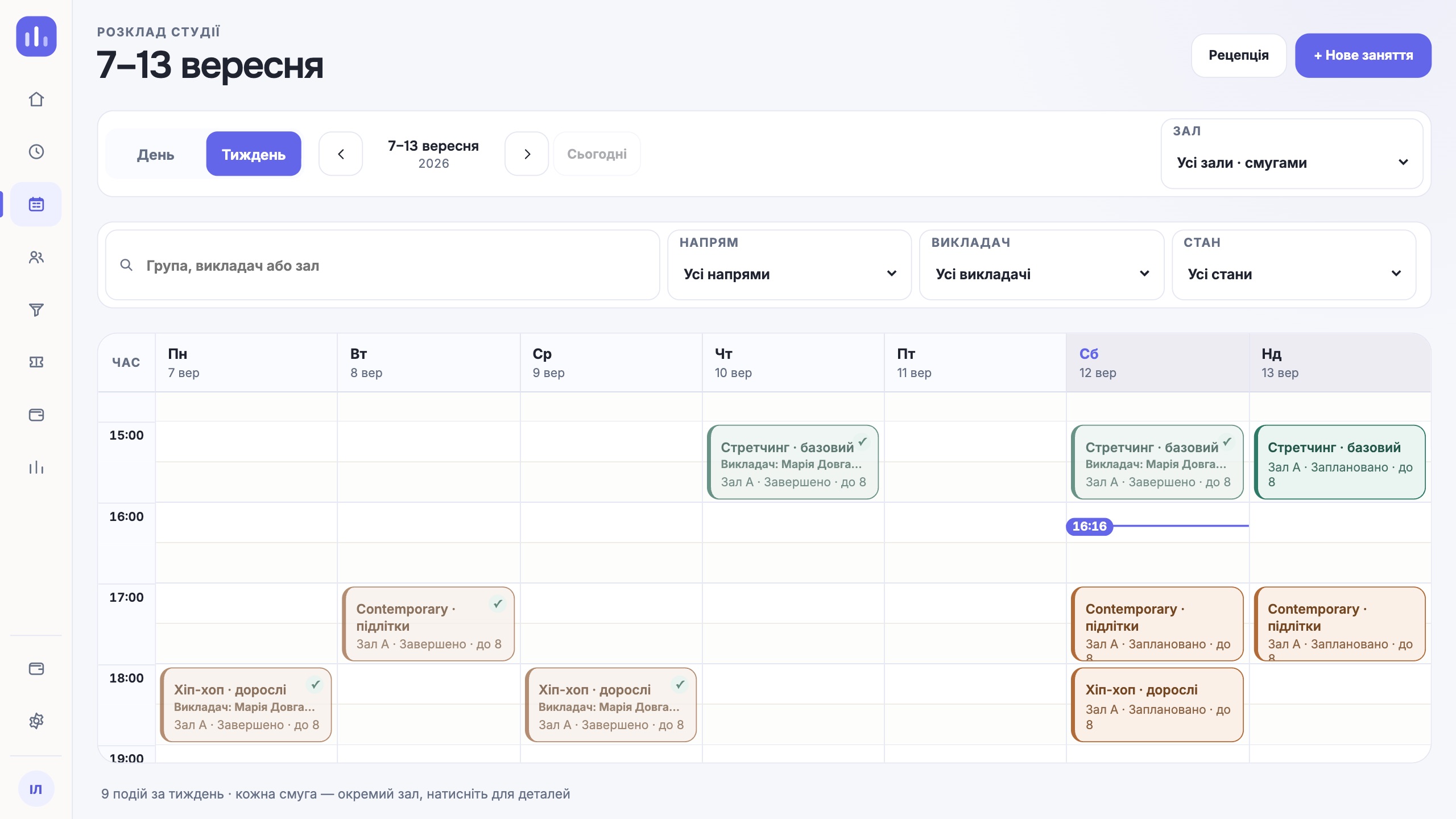
A schedule with groups and rooms
Recurring classes, several rooms, instructor substitutions. The system should warn about a conflict before you save, not after two groups have turned up in one room.
Group capacity
If the room has twelve spots, the thirteenth person should not be able to book. Whoever is too late goes on the waitlist, and a freed spot passes to the next person.
Memberships with a balance
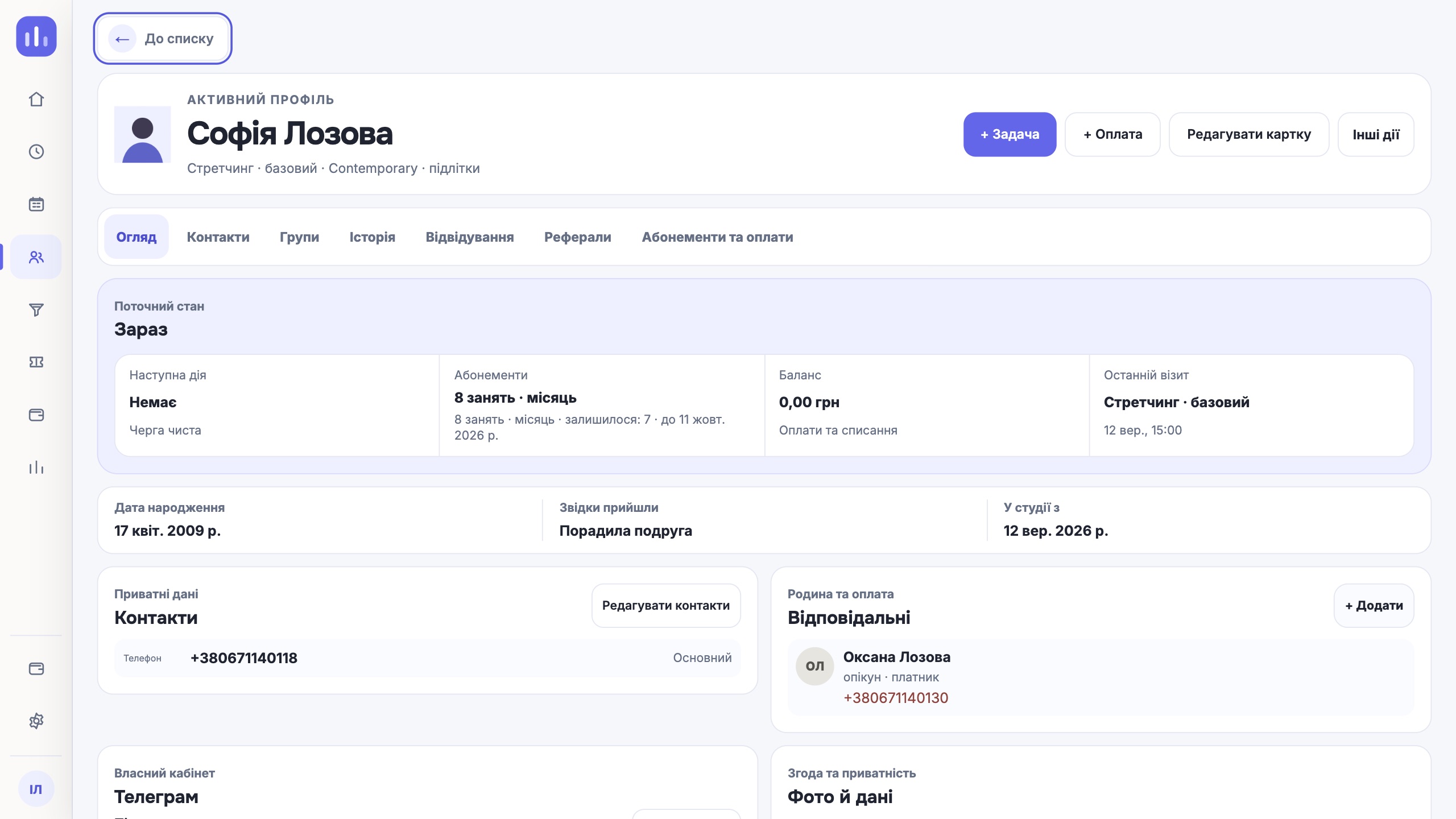
How many classes are left, when they expire, whether they can be frozen. The client and the front desk must see the same balance.
Attendance check-in
One action at the door: the person arrives, the visit is deducted, the log updates. No separate notebook and no evening reconciliation.
Client reminders
A message the day before class cuts the number of people who simply do not show up. Clients should see their own schedule and balance without calling the front desk.
Money you can trace to its source
Payments, debts, refunds and team pay should lead back to a specific class and a specific person, not to a separate spreadsheet someone keeps by hand.
How it works in ClubBase
One studio day, from lead to payroll.
An action in the schedule immediately changes what the front desk, the instructor, the client and the owner see. There is no need to reconcile chats with spreadsheets.
- 01
Lead
Someone requests a trial class. The lead gets an owner and a next step instead of getting lost in direct messages.
- 02
Booking into a group
The front desk adds the person to a group. The schedule checks the room, the instructor and capacity before saving.
- 03
Membership
The client buys a class pack. The balance, expiry date and any freezes are stored in their profile.
- 04
QR at the door
A check-in updates the front desk log and the membership balance in one move. It works without internet too.
- 05
Telegram
The client sees the schedule, their balance and their QR code in the bot. No separate app to install.
- 06
Payroll
Instructor pay is calculated from classes taught under your studio rules, and you can open any amount down to its source.
Comparison
Notebook, spreadsheet, booking app and ClubBase.
| What a studio needs | Notebook | Google Sheets | Beauty booking app | ClubBase |
|---|---|---|---|---|
| Group and room schedule | on paper | by hand | slots per specialist | groups, rooms, recurring classes, substitutions |
| Conflict check | none | none | per specialist | before the class is saved |
| Capacity and waitlist | none | by hand | rarely | yes |
| Memberships with a balance | none | formulas | often missing | class packs, unlimited, freezes |
| Client, guardian and payer kept separately | none | none | none | three roles in one profile |
| Attendance check-in | by hand | by hand | by hand | QR, online and offline |
| Client reminders | phone call | by hand | SMS or push | Telegram bot |
| Instructor payroll | calculator | formulas | none | from classes taught |
Honestly
When you do not need this kind of software.
- You work alone and have up to ten clients. A notebook and phone reminders are cheaper and faster.
- All your sessions are private, there are no memberships and people pay on the spot. A slot booking app will do.
- You have just opened and do not know yet which groups will stay. Let the schedule settle first.
In every other case the maths is simple: one person who missed a class because they forgot costs more than a month of the software.
About the price
Is there free software?
Yes, and for some businesses it is enough for a long time. We have put together what exactly is free, where it hits a wall in studios with groups and memberships, and what it costs to go past that point: free client booking software.
By studio type
What booking looks like for your type of studio.
Frequently asked questions.
How is studio software different from a client booking app?
A booking app puts one person into one slot with one specialist. A studio needs groups with capacity, memberships with a balance, and separate roles for client, guardian and payer. That is the difference: in studio software, booking is only the start of the chain, not the whole job.
Can clients book both group and private classes?
Yes. Group and one-to-one classes live in the same schedule, so you see room and instructor availability together.
How do clients book on their own?
Clients see the schedule, their balance and their QR code in a Telegram bot. There is no separate app to install, and the ClubBase bot is included in the plan.
What happens when a group is full?
The system will not let you book an extra person. You can put them on the waitlist and pass the spot to them when someone cancels.
Does the software calculate instructor pay?
Yes. Payroll is based on classes taught and your studio rules, and you can open every amount down to its source.
How much does it cost?
The price depends on the number of active students and starts at $9 a month. The first 14 days are free, no card required.
Set up your schedule and see for yourself.
14 days, no card. We will move your client spreadsheet over if you already have one.